
Send a document to verification / approval from the document
The document must be in Read mode
Select Send to verification in the upper right corner

Send a document to verification / approval from the document folder
Select document
Click on 3 dots
Select send to verification

Select verifier (start writing the name)
Decide if you want a reminder or not (this means that the verifier or apporver gets a reminder every 15 days until he/she has done something with the document)
Decide the number of reminder days if you want a reminder to be sent
Write a message to the verifier if you want - this message will come in the e-mail to the verifier and only there
Write what is changed in the changelog
SEND
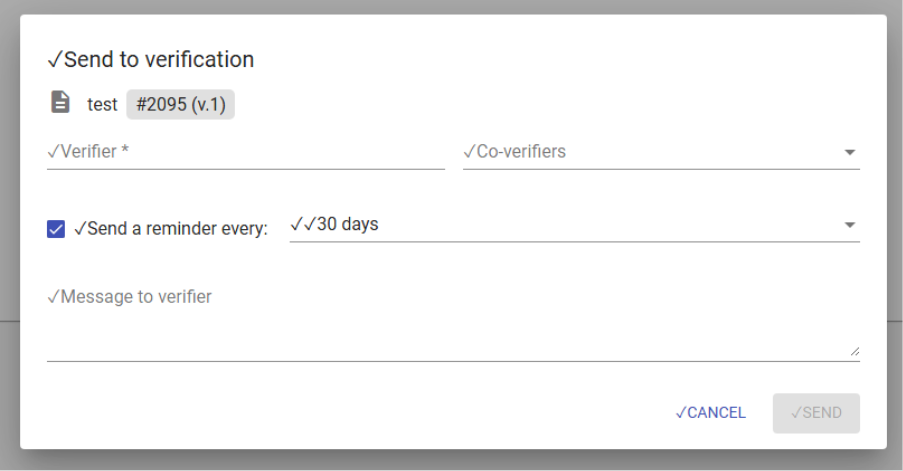
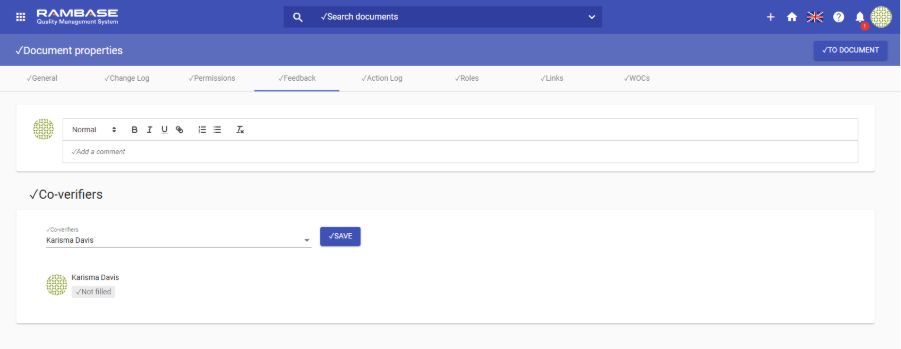
If a document is large or complex, it can be helpful to have it verified by additional co-verifiers. A co-verifier can be added to add additional feedback and confirm or not confirm a document before verification by the main verifier. Co-verifiers can be added when sending a document to verification or from the Document Properties under the Feedback tab.
Permissions for co-verifiers must be the same as the permissions for the main verifier.
Feedback from co-verifiers is not mandatory for a document to be officially verified. The main verifier determines when a document is sufficient to be sent to approval. Feedback from co-verifiers is not assigned a review deadline.
Co-verifiers will receive a notification that they have a document to verify. The document will also show in their To-Do panel (To verify) and under My documents (Waiting for verification and I'm verifier). The co-verifier can also review, add and edit their feedback from these areas.
The co-verifier's name, comment, verification (Confirmed/Not Confirmed/or empty if no response), and date of verification are displayed in the Document properties of the document.
You can also send a document back to the author in stead of verifying or approving the document
